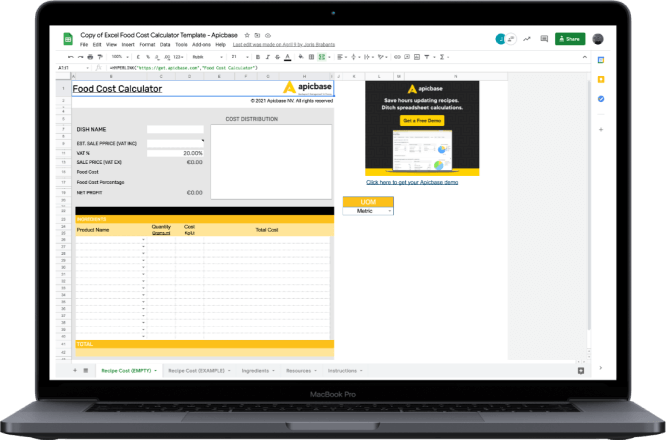
Download a free food cost spreadsheet for Excel and Google Sheets, built for restaurants and multi-recipe menus, with the formulas already built in.
Enter your ingredients and prices once, and it gives you the cost of every recipe, the food cost percentage, and a menu price that hits your target margin. It is yours to keep, customise, and reuse across your whole menu.
A food cost template is what you reach for when you want to save your recipe costings. It works offline, it lives in one file, and you can adapt it to your kitchen: add columns, build a recipe library, change the layout for how your team actually works.
The real advantage is reuse. Once your recipes are in the sheet, re-costing them when prices move is a two-minute job rather than a fresh start every time.
The template gives you one row per ingredient and the columns you need to turn a recipe into a number:
Each line multiplies quantity by unit price, adjusts for yield, and the sheet totals it into a plate cost and a food cost percentage. That is the whole calculation in one sentence.
If you want the full method, including the difference between a single dish and your monthly food cost, read how to calculate food cost percentage.
Because every ingredient sits in the sheet with its unit cost, the same file doubles as a food cost inventory spreadsheet: a running record of what each item costs you today.
If you prefer to cost a single dish without downloading anything, Use our online food cost calculator. The page also explains yield benchmarks by ingredient and typical food cost ranges by restaurant type.
Set up one tab as your master ingredient list: ingredient name, current price, and unit, with one row per ingredient. In your recipe tabs, each recipe’s cost cell points to the master list with a cell reference. The line reads =’Ingredients’!B4 * C2. This means the master price is multiplied by the quantity of that recipe. You don’t have to manually make a food cost calculation per recipe.
Now when a supplier raises the price of butter, you change one cell on the master tab. Every recipe that uses butter re-costs itself instantly. No hunting through 20 recipe sheets, no missed updates. This is how a disciplined operator runs costings on a spreadsheet without it falling out of date.
It is also, in miniature, what a recipe management system does automatically: hold ingredients once, feed every recipe from them. The spreadsheet version works well until the number of recipes, sites, and price changes outgrows what one person can keep current by hand.
The template opens in both Excel and Google Sheets, and the formulas carry across, so use whichever your team already uses. Make a copy, enter your ingredients on the master tab, and start building recipes.
If you would rather build your own from scratch, the minimum structure is straightforward. Create one row per ingredient with columns for unit price, quantity used, yield %, and a calculated cost cell (=unit price * quantity / yield %). Add a totals row that sums the ingredient costs into a recipe cost (=SUM(…)), divide by portions for the cost per plate, and add a menu-price cell so you can read your food cost percentage against the price (=plate cost / menu price). Keep one recipe per tab and link them all back to a single ingredient list, as above.
That is enough to cost a menu of one or two dozen dishes.
A spreadsheet is the right tool for a single site with a manageable menu and one person looking after it. It starts to strain when your food service operation grows beyond that.
Prices change weekly across dozens of suppliers. Portions drift. A chef at one location tweaks a recipe, but doesn’t update the master sheet. Or, each site needs its own pricing. None of that fits neatly into a file someone has to update by hand.
The usual outcome is that operators re-cost once a quarter and only discover at month-end that they have been losing margin for 10 weeks. That gap between what your recipes say a dish should cost and what it actually costs is food cost variance, which widens your restaurant COGS without warning. A spreadsheet can’t identify the gap.
This is where food costing software takes over. Apicbase keeps recipes, ingredients, purchasing, and inventory connected, so when a price, supplier, or portion changes, every related recipe updates automatically, and you can compare theoretical cost against what you actually spent, per site.
It is the same idea as your linked ingredient list, but run across thousands of recipes without the manual upkeep. Circus Kitchen used it to cut food cost by 18%.
A spreadsheet gets you costing recipes today, and the free template is a good place to start. But once you’re running more than a handful of restaurants, Excel gets slow and error-prone. That’s when you need software instead. Apicbase automatically keeps every recipe costed across all your sites, with live supplier prices and built-in actual-versus-theoretical food cost.